How do PointProven's quality checks work?
How to read findings and decide what to change.
Updated 16 November 2026
Introduction
PointProven checks your deck while you write: figures with no source, evidence that misses its point, slides that say too much. A check never stops you. You can always go on to the next step and export.
How to
The six categories
Every check belongs to one of six categories. Each category has its own shape. Every finding starts with the category's name so you can identify the kind of problem.
| Category | Shape | What it looks at |
|---|---|---|
| Structure | Square | How points are grouped and ordered: three to five a group, no overlaps, a sensible order, a slide that holds too much, a next step with no owner or deadline, and, on a Win the work deck, each of its four supports. |
| Logic | Triangle | Whether the argument holds: each point answers the Question and its parent's question, points stand on their own, no claim contradicts another, the answer keeps to the limits your material sets, and, in Frame, whether the Question fits its structure. |
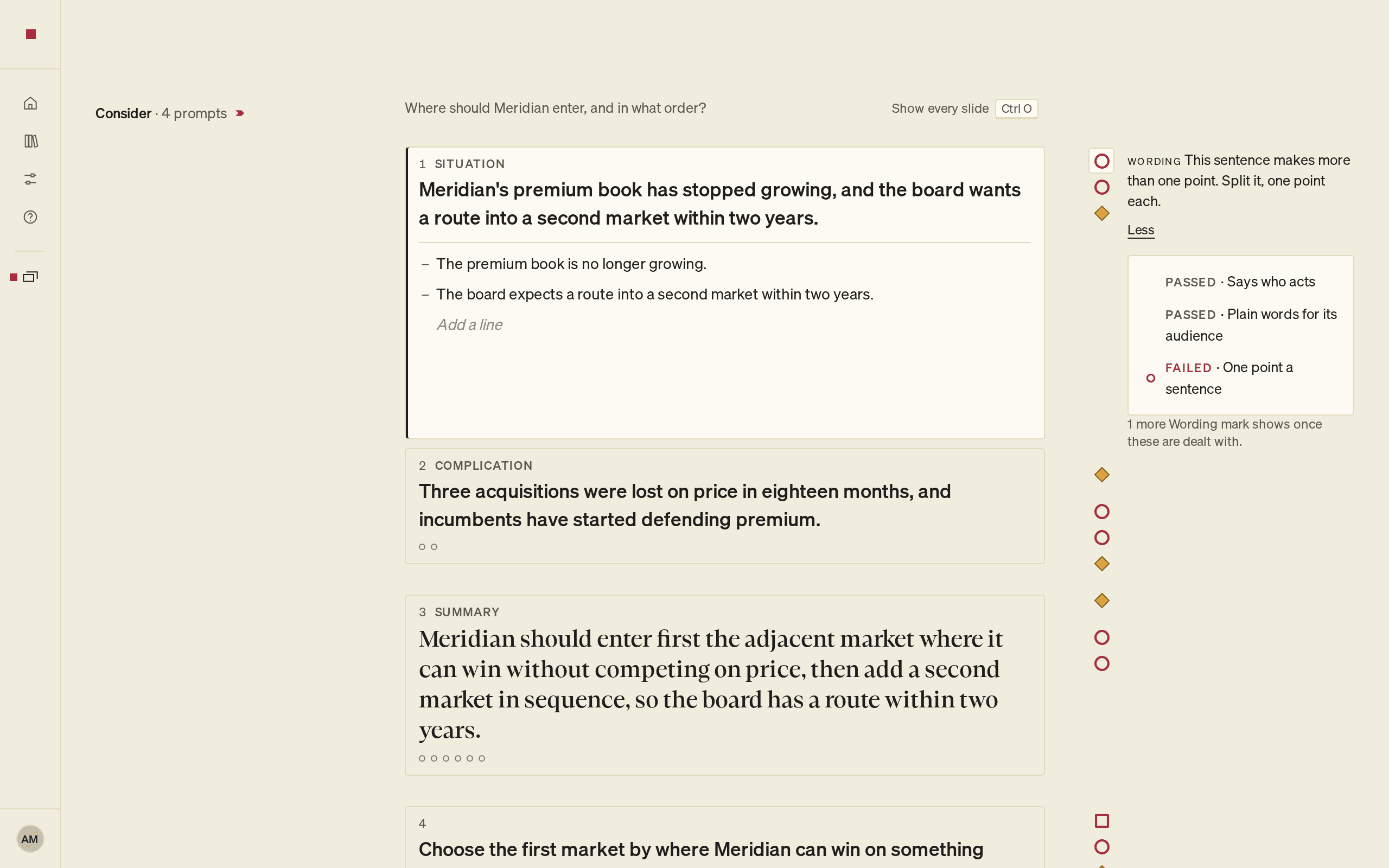
| Wording | Circle | How the words read: a headline that states its point, who acts, plain words for your audience, one point a sentence, short lines, hedges and acronyms. |
| Sources | Diamond | Whether each figure stated as fact has a source, matches it, is stated by it and is current. See Cite a source. |
| Evidence | Hexagon | Whether a piece of evidence supports its point. |
| Gaps | Broken ring | What the argument leaves out: an unstated premise or a missing alternative. Only when you press Challenge me in Argue. |
To check spelling, press ⌘K (Ctrl+K) and choose Check spelling. Spelling is not one of the six categories.
Which steps show which
| Step | Categories shown |
|---|---|
| Frame | Logic: whether the Question fits its structure. Consider is guidance, not a check. |
| Argue | Structure, Logic, Sources and Evidence, and Gaps when you press Challenge me |
| Outline | Structure, Logic, Wording, Sources and Evidence |
| Design | Structure, Logic, Wording, Sources and Evidence |
| Deliver | Structure, Logic, Wording, Sources and Evidence |
Wording checks start in Outline, where you write the slides. Gaps findings come only from Challenge me, in Argue.
Only proven checks show
A check shows only once it has passed PointProven's own tests. A check that has not passed them does not show at all: no mark, no line, not even Unchecked. So a check you expect may be missing because it is not available yet. More checks arrive during the beta.
A passed check has no mark, but the absence of a mark does not mean every check passed. A check may be unavailable or may not have run yet. When a check has passed, Details labels its result Passed.
Where findings appear
A finding shows as a mark beside the item it concerns. In Argue and Outline, the right column shows the finding in full for the item you are in. F8 goes to the next issue, and Shift F8 to the one before. In Design, F8 goes to the next slide card with an issue.
In Deliver, open findings are listed under Before you send and In the file. See Review and export your deck.
For what each mark looks like, see What each indicator means.
Act on a finding
Some findings come with a fix, labelled Suggested fix. It never changes your text until you apply it.
- Select Apply (⌥Enter or Alt+Enter) to put the fix into your text. PointProven checks it again.
- Select Dismiss to remove the suggestion. The mark stays, so you can come back to it.
- Select Details to see each check's result.
You can also edit the text yourself. The checks run again when you finish the sentence.
FAQs and common issues
Does no mark mean every check passed?
No. A passed check has no mark, but an unavailable check or one that has not run can also have no mark. When a check has passed, Details labels its result Passed.
Why are some findings held back?
A slide shows at most two Wording marks, two Sources marks and two Evidence marks. The rest wait, and a line says so, for example 1 more Wording mark shows once these are dealt with. Deal with the marks you can see and the next ones appear.
What does Unchecked mean?
Sometimes a check cannot give an answer, for example on a figure you have just edited. The item reads Unchecked, never passed. If the details say it couldn't be checked just now, select Check again in the finding's details or in Deliver. If they say the check couldn't decide, edit the line instead.
How do I report a check I think is wrong?
- Select Help in the menu down the left of the page.
- Under What happened, or what would help?, say which check you think is wrong and where it appears.
- Select Send. PointProven replies by email.